Repeats and jumps
Simple repeats
You can create a simple repeat by placing a start and an end repeat barline at the beginning and end of a passage. These barlines are applied from the Barlines palette, and, as of version 2.1, also from the Repeats & Jumps palette.

Note: If the start of a repeat coincides with the beginning of a piece or section, the start repeat barline can be omitted if desired. Similarly, an end repeat barline can be omitted at the end of a score or section.

1st and 2nd endings
First create a simple repeat (as shown above), then apply the first and second time endings—see Voltas.
Playback
To hear repeats during playback, make sure the "Play Repeats" 
To set the number of times that a repeat section plays back:
- Make sure the start and end repeat barlines are in place (e.g. Simple repeats above).
- Right-click on the last measure before the end repeat barline and select Measure properties.
- Adjust "Play count" ("Repeat count" prior to version 2.1) as required.
Repeat symbols and text
Text and symbols related to repeats are located in the "Repeats & Jumps" palette (in the Basic and Advanced workspaces). This palette contains:
- Symbols for measure repeat, Segno, Coda, and, as of version 2.1, repeat barlines
- D.S., D.C., To Coda, and Fine text
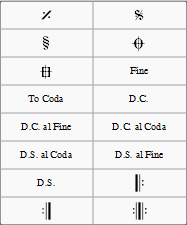
To add a repeat symbol to the score use either of the following:
- Drag and drop a repeat symbol from the palette onto (not above!) the desired measure (so the measure changes color).
- Select a measure, then double-click the desired repeat symbol in the palette.
Jumps
Jumps are symbols in the score which tell the musician, and playback, to skip to a named marker (see below). Jumps include the various kinds of D.C. (Da Capo) and D.S. (Dal Segno) text.
If you click on a jump, some text boxes and a checkbox are displayed in the Jump section of the Inspector. These have the following effects on playback:
- Jump to: Playback jumps to the marker whose "Label" is the same as the "Jump to" tag.
- Play until: Playback continues until it reaches a marker whose "Label" is the same as the "Play until" tag.
- Continue: Playback jumps to the next marker whose "Label" is the same as the "Continue" tag.
- Play repeats: (As of version 2.2) Ticking this box tells MuseScore to play repeats after D.C. (Da Capo) or D.S. (Dal Segno) jumps. If this option is not ticked then simple Repeats are not taken after jumps and playback works as if it were the last repeat. Note: Ticking this option makes no difference to playback in versions prior to 2.2.
Note: The tags start and end, referring to the beginning and end of a score or section, are implicit and don't need to be added by the user.
Markers
Markers are the places referred to by the jumps. A list of markers (in addition to the implicit "start" and "end") follows:
- Fine: (tag: fine)
- To Coda: (tag: coda)


If you click on a marker, the following properties appears in the Marker section of the Inspector:
- Marker type: This can be changed from the dropdown list, if required.
- Label: This is the (identifier) tag associated with the marker. See also, Jumps (above).
Examples of jumps
- Da Capo (D.C.): At the "D.C." sign, playback jumps to the start (i.e. to the implicit start tag) and plays the entire score or section again (i.e. up to the implicit end tag).
- Da Capo (D.C.) al Fine: At the "D.C. al Fine" sign, playback jumps to the start (i.e. to the implicit start tag) and plays the score up to the Fine (i.e. the fine tag).
- Dal Segno (D.S.) al Fine: At the "D.S. al Fine" sign, playback jumps to the Segno symbol (i.e. the segno tag) and then plays up to the Fine (i.e. the fine tag)
- Dal Segno (D.S.) al Coda: At the "D.S. al Coda" sign, playback jumps to the Segno symbol (i.e. the segno tag) and then plays up to the To Coda (i.e. the coda tag). Playback then continues at the Coda symbol (i.e. the codab tag).
Note: The properties (i.e. the tag names) of jumps and markers can be set via the Inspector. You need to modify them if using multiple jumps and markers.
See also
External links
- MuseScore in Minutes: Repeats and Endings, part 2 (video tutorial)
- How to separate a coda from the rest of the score (MuseScore HowTo)