Scrapbook of feature changes and additions
Warning: this page is very outdated.
Purpose
As feature changes are made to MuseScore, they may be listed here. This will help developers in tracking work, help testers in using the nightly builds to try out new features and perhaps provide feedback, and perhaps most importantly, it will also help serve as a checklist of features needing documentation as MuseScore approaches a new release. The distinction between new feature and bug fix is sometimes blurry, but if a change will require documentation, it should probably be listed here.
Users should understand that features listed here may still be experimental and subject to further change or even removal.
Developers: Feel free to list new features here whether completely implemented or not. You may indicate any known limitations or bugs if you like, as well as any further enhancements you are considering. You may also wish to indicate whether users may provide feedback on the feature, and if so, whether you would prefer they do so via the issue tracker, the forums, the developers list, private email, or by other means. Provide as much or as little detail as you like. Even just listing a feature name with no additional information would be useful for the purpose of making sure it does not fall through the cracks when it comes time to create documentation.
Note: This page itself is experimental and subject to change in form and direction. A template for feature changes/additions is provided as a starting point, but if a different format is deemed more appropriate, feel free to use one and even to update the template if you feel this would make sense for others.
Changed / Added Features
Constrained dragging
- Description: allows you to limit a given drag operation to horizontal or vertical movement only
- Usage: ctrl-drag to move elements horizontally; shift-drag to move them vertically
- Known limitations/bugs/opportunities: element is first reset to original/default position
- Feedback desired:
Notes: See http://musescore.org/en/node/9346
More flexible clef changes
Rev. 4080 implements more flexible clef changes. Example is a piano score where the top staff starts with a G clef and switches immediately to an F clef.

Drag/Drop elements on score view
Elements on the score view can be used like palette elements. For this press Shift+Ctrl and drag an element with left mouse button.
This also allows to drop elements from the score view to a palette. (First you have to make the palette changable; see palette context menu).
Continued Drop
If you press Shift+Ctrl and drag an element from the palette, the operation does not end on drop. You can can continue to drop to other locations. This is currently not implemented for all kind of elements. Tested with articulations.
Enhanced Clef Layout
Clef layout spacing was changed in revision 4101. In previous versions clefs looked like:


This is the new spacing:


The changes may have side effects and need testing.
Local Time Signatures
Time signatures can be different for different staves. An example here is Bach's 26. Goldberg Variation:

MuseScore has the concept of a global time signature and an actual (local) time signature. You change the global time signature by dragging and dropping a palette object to a staff. The global time signature is used to count beats (as shown in the status line) and is the reference for tempo markings. The global time signature is the same for all staves and normally identical to the actual time signature.
The actual time signature is set in the time signature property dialog and can deviate from the global time signature for every staff (left hand 18/16 in the example)
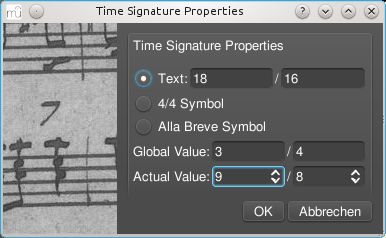
The text of the time signature can be set independent of the actual values.
A local time signature is set by dropping a time signature symbol with the Ctrl key pressed. The local time signature is set only for one staff. A global time signature is replicated for all staves.
Album Manager
The album manager allows to prepare a list of scores. The list can then be saved as an album file ("*.album").
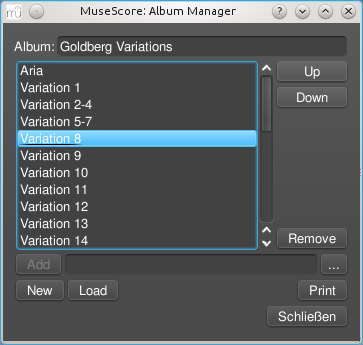
The first implemented action for an album is "Print". The album scores are printed in order with the correct page numbers set overriding the page number offset values in "Page Style". The album is printed in one print job so double sided printing (duplex printing) also works as expected.
Layers
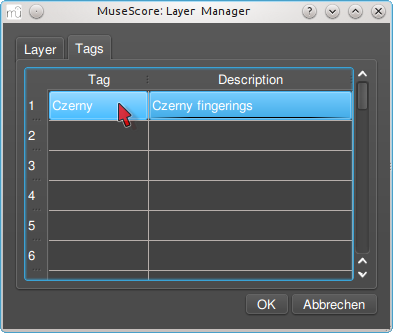
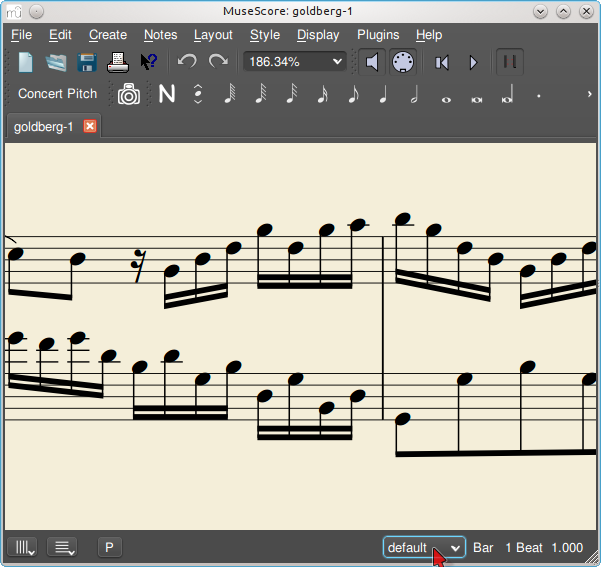
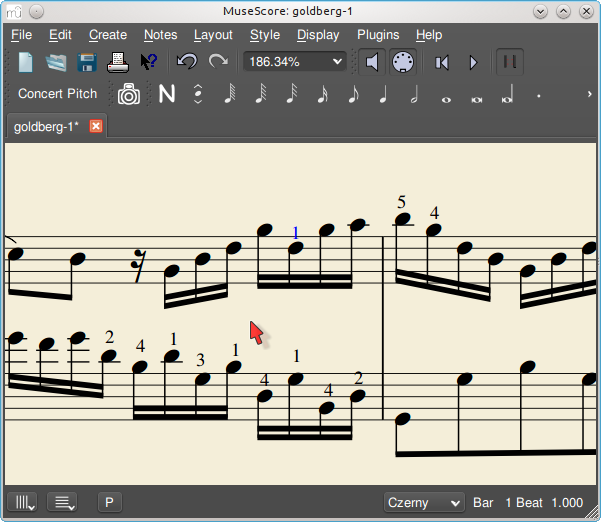
For the Open-Goldberg project I want to be able to create different versions of the score. One version is the "Urtext", a score which is close to the original version of Bach. A second version could be a Czerny variation, which in addition to the Urtext contains fingerings.
The layer feature allows to create different versions out of one score file. If you want to add fingerings you have to create a layer and tag the fingering elements with the layer name.
First create layers:
Second create a score variant:
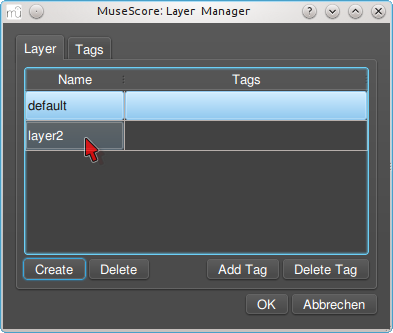
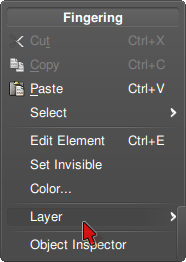
Add the visible layer to the score variant. Then select all fingerings and tag them with the name of the score variant:
Default layer:
Czerny layer:
Metronome
- Description: You can switch a metronome on and off during playback and the cursor now moves beat by beat. It's a new button in the toolbar.
- Usage: If you use MuseScore as a repeater, you now have a metronome
- Feature request: #4199: Metronome on playback
Follow and unfollow the score during playback
- Description: You can switch the following of the score on and off during playback. It's a new button in the toolbar
- Usage: It's now possible to listen to a measure while scrolling around the score.
- Feature request: #12331: Option to not pan the score while playing
Local Relayout
Notes and Rests at the same time position are vertically aligned by default. Sometimes this is not desired.
A new feature allows to relayout beamed notes and rests without considering notes/rests in other staves.
Before setting relayout flag:

Checking relayout flag:

After setting relayout flag

Other examples: http://musescore.org/en/node/18826#comment-68687
Programmable MIDI actions
- Description: When you are entering notes with a MIDI keyboard, you need to go back to your computer keyboard to play or to change note durations. Now you can program some keys on your MIDI keyboard to do these actions.
- Usage: Go to Preferences -> Note Entry to program MIDI actions.
- Known limitations/bugs/opportunities: None. Please report in the issue tracker.
- Feedback desired: Yes
New audio architecture: SF3, Aeolus, Zerberus, effects
- Description: A new audio architecture for synthesizer and effects.
- Read more about it
- Feedback welcome
Repitch mode
- A simple way to change pitches of a passage without affecting the rhythm, ornaments, slurs etc...
- Read more about it
- Feedback welcome
Extended Ties


WYSIWYG chord symbols
- Description: you can now type chords however you like, and they will be understood and rendered as well as possible. So you can type Bbm7, Bbmi7, Bbmin7, or Bb-7 and they are all understood as minor seventh chords and rendered well. A "Standard" and "Jazz" rendering style are provided and will render similarly to the old "stdchords.xml" and "cchords_muse.xml" in terms of fonts, superscripting, etc, but both styles support this WYSIWYG mode so you can always use whatever abbreviations you like, use parentheses around alterations or not, etc. In addition, you can enter parentheses around chords to show they are optional, and they will still be handled correctly. Otherwise unparseable entries like "N.C." or "/" are also rendered consistently with other chords.
- Usage: Chords are entered just as before; you just don't have to be so careful about how you spell them
- Known limitations/bugs/opportunities: As long as the root is recognizeable, the chord will render and transpose reasonably. So Bbrandom will transpose as Crandom, etc. But MusicXML exports only works to the extent the chord is actually understandable according to a predetermined list of acceptable abbreviations for major, minor, etc. Eventually we could allow this list itself to be customizable if there is felt to be sufficient need.
- Feedback desired: Any. Most interesting: are there examples of chord symbols that can be found in published literature that are *not* handled correctly?
Notes: this is how a variety of different chord symbols will render in the "Jazz" style:

International chord symbols
- Description: adds options for Solfeggio and Lower case minor chords, improves German chord mode
- Usage:: Style / General / Chordname, select from radio buttons for Standard, German, Solfeggio root naming, checkbox for Lower case minor chords. Existing chords are automatically converted to selected style, and new chord entry respects these settings, so typing Do7 in Solfeggio mode results in a C (Do) dominant seventh chord rather than a D diminished, and typing "a7" in Standard mode with "Lower case minor chords" enabled is understood as a minor seventh chord rather than a dominant seventh.
- Known limitations/bugs/opportunities: further customizations (such as rendering "Re" with an accent on the "e") are possible by editing the chord description file.
- Feedback desired: Did we get the most important case, and are they handled correctly? Specifics were taken from LilyPond for the most part. For instance, in German mode, chords are now rendered with accidentals as "is" and "es" rather than sharp and flat; bass notes always lower case regardless of major/minor. In Standard or Solfeggio modes, with "Lower case minor chords" checked, bass notes remain upper case. In Solfeggio mode, we use "Do", "Sol" and "Si" rather than "Ut", "So", or "Ti". Are any of these decisions contrary to what most people using these options would expect?
Notes:
Count-in
- Description: You can switch on and off a count-in to be played each time the playback starts. The count-in plays beats for a full measure (according to nominal time signature at playback starting point); if the starting point is mid-measure or at a 'short' measure (anacrusis), it also plays enough beats to fill the measure missing part. User interface: a button in the Play Panel.
- Usage: If you use MuseScore as a MinusOne repeater, you can sync your 'entrée' with MuseScore's.
(Feature name)
- Description:
- Usage:
- Known limitations/bugs/opportunities:
- Feedback desired:
Notes: