Hairpins
Add a hairpin
Hairpins are line objects. To create a hairpin:
- Select a range of notes or measures;
- Use one of the following shortcuts:
- <: to create a crescendo hairpin.
- >: to create a diminuendo hairpin (decrescendo).
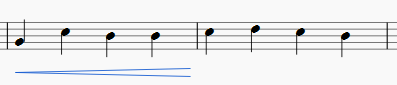
Alternatively, use one of the following options:
- Select a range of notes or measures, and double-click a hairpin in a palette.
- Drag and drop a hairpin from a palette onto a staff line.
Adjust length
-
Double-click on the hairpin to enter edit mode. Then click on the end handle that you want to move:
-
Use one of the following shortcuts:
- Shift+→ to move the end handle, and its anchor, right by one note or rest.
- Shift+← to move the end handle, and its anchor, left by one note or rest;
This method of extending or shortening the hairpin maintains playback integrity and allows it to cross line breaks:
-
To change the position of an end handle without changing the position of its anchor, use the following shortcuts:
- → to move the handle right by 0.1 sp.
- ← to move the handle left 0.1 sp.
- Ctrl+→ (Mac: Cmd+→) to move the handle right one sp.
- Ctrl+← (Mac: Cmd+→) to move the handle left one sp.
Note: The commands listed in step 3 are only used to tweak the final appearance of the hairpin (e.g. see image below): they do not change its playback extent nor do they allow it to cross line breaks. If you want the latter, use the Shift+→ or Shift+← commands instead (step 2).
Note: The "Reset" command (Ctrl+R (Mac: Cmd+R)) will undo these small adjustments, but will not undo anchor changes.


Cresc. and dim. lines
In addition to hairpins, there are cresc. _ _ _ and dim. _ _ _ lines with the same function in the Lines palette. To change the text (e.g. to cresc. poco a poco, or decresc. instead of dim), right-click on the line and choose Line Properties....
To turn a hairpin into its equivalent text line:
- Select the hairpin.
- In the Inspector, set "Line style" to "Wide dashed."
- In the Inspector, select the "Text line" checkbox.
Hairpin playback
Crescendo and diminuendo lines only affect playback from one note to the next: they have no affect (currently) on the playback of a single note or a series of tied notes.
By default, hairpins will affect playback only if dynamics are used before and after the hairpin. For example, a crescendo spanning notes between p and f dynamics will cause a dynamic change on playback. However, between any two successive dynamics only the first appropriate hairpin will have effect: a diminuendo between p and f will be ignored; of two or more crescendos between p and f, all but the first will be ignored.
A hairpin may be used without dynamic marks, by adjusting "Velocity change" in the Inspector (values in the range 0 to 127).