Voltas
Volta brackets, or first and second ending brackets, are used to mark different endings for a repeat.

To add a volta to the score
Use one of the following methods:
- Select a measure, or range of measures and double-click a Volta icon in the Lines palette.
- Drag-and-drop a volta from the Lines palette, then adjust the length as required (see below).
To change the number of measures that a volta covers
- Double-click the volta to enter edit mode. The end handle is automatically selected.
- Press Shift+→ to move the end handle forward one measure. Press Shift+← to move the handle backward one measure. Repeat as required.
Note: Only the Shift commands will alter the playback start and end points of the volta. To make fine adjustments to the visual start or end points you can use other keyboard arrow commands, or drag the handles with a mouse, but these do not affect the playback properties.
When you select a start or end handle, a dashed line appears connecting it to an anchor point on the staff. This anchor shows the position of the playback start or end point of the Volta.

Text
You can change the text and many other properties of a volta bracket using the line properties dialog. Right-click on a volta bracket and choose Line Properties.... The figure below shows the volta text as "1.-5."


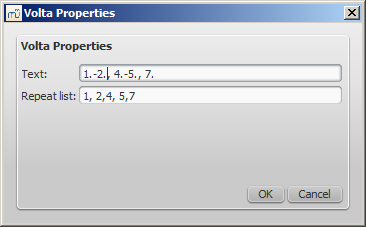
You can also right-click on the volta and bring up the volta properties dialog. From here, you can change both the displayed Volta text (the same from the line properties above) and the repeat list. If you want one volta to be played only on certain repeats and another volta on other repeats, enter the repeat times in a comma separated list. In the example below, this volta will be played during repeat 1, 2, 4, 5 and 7. Another volta will have the other ending, like 3, 6 and possibly other higher numbers like 8, 9, etc.
Playback
Sometimes a repeat plays more than two times. In the figure above, the volta text indicates that it should play five times before it continues. If you want to change the number of times MuseScore plays a repeat, go to the measure containing the end repeat barline and change its Play count (Repeat Count prior to version 2.1). See Measure operations: Other properties for details.