Fermata Placement
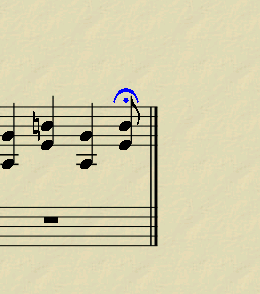
See attached. Fermata too close to note.
| Attachment | Size |
|---|---|
| Fermata.png | 23.54 KB |
See attached. Fermata too close to note.
| Attachment | Size |
|---|---|
| Fermata.png | 23.54 KB |
Do you still have an unanswered question? Please log in first to post your question.
Comments
Yes, that bothered me too (especially in flute parts where the fermata frequently went right on top of the note), so I manually dragged and dropped it up a little higher each time I did it, but I got tired of doing that, so I went in search of the answer. I found it following these steps (using MuseScore 0.9.5)...
1. ) Select "Style"
2. ) Select "Edit Style"
3. ) Click "Articulations, Ornaments"
4. ) Select "ufermata" (up fermata)
5. ) Above that, increase the "Articulation - note stem distance". It's set at 0.50sp. I found that increasing it to 1.50sp is perfect for me, but if you want them a different height, you can fiddle with the amount to get just what you want.
6. ) Click "Ok"
Now all fermatas that you place should be higher. I assume you could do the same thing for fermatas that appear under the note by selecting "dfermata" and increasing the same setting, but I put all my fermatas on top no matter which way the stem goes, so it works for me.
In reply to Raising Fermatas by newsome
Thanks.