How to place a beam between notes (zig-zag)
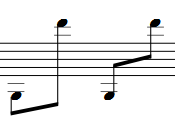
If two neighbouring notes have contrasting vertical positions and share a beam, it may be preferable to situate it between the notes instead of below or above them.
- Double-click the beam to enter edit mode; two handles appear - the left one is for moving the beam vertically and the right one is for adjusting the angle.
- Move the left handle between the notes. Adjust the right handle afterward if you want.