Configure MuseScore and Jack for playback to a MIDI keyboard
Ever wondered how to playback your MuseScore score on your keyboard? Now you can with Jack and MuseScore 0.9.6 for Windows. In this post, you will find the instructions how to configure Jack and MuseScore. I believe MuseScore is one of the first applications to support Jack on Windows so be aware this is still experimental.
Requirements
- MuseScore 0.9.6
- Jack 1.9.5 or higher for Windows
- A MIDI keyboard correctly set up
Configuration
Download and install MuseScore 0.9.6
Download Jack at http://www.grame.fr/~letz/jack-1.9.5.tgz
You can use 7zip (http://7zip.org) to open tgz files on windows.
Install with the binaries in jack-1.9.5\jack-1.9.5\bin\windows
run "Jack Control"
Choose "Setup..."
- server path :jackd -S -R -X winmme
- Driver : portaudio
Start jack server by clicking Start in "Jack Control"
Run MuseScore
In Edit -> Preferences ->I/O.
- Uncheck Portaudio
- Check Use Jack Midi output
Restart MuseScore
In Jack Control, click on "Connect"
In the "Connections" windows, click on the MIDI tab.
On the left side you should see Mscore1, this is MuseScore outputs.
On the right side you should see, your MIDI keyboard input, it's one of the playback.
Click Mscore1 and mscore-midi-1 on the right, and right click system_midi -> playback to link musescore with your keyboard
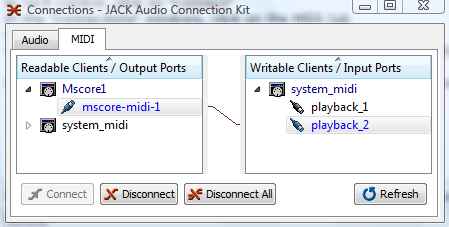
Now you can click on play in MuseScore or in Jack Control and you hear your piano playing
Comments
bonsoir
J'ai essayé et ça fonctione.Parcontre sur une partition comprenant une voix plus l'accompagnement au piano.Tout est joué au piano.Comment peut on modifier les voix ?
Merci
In reply to sortie midi windows by fred87
J'ai pas testé. Mais peut être avec Affichage->Mélangeur. Change l'instrument de la voix
In reply to Not tested by [DELETED] 5
La fonction mélangeur n'agit que sur le synthé interne.
Si l'on change les voix sur le synthé cela ne change rien non plus
In reply to son midi by fred87
Le soundfont fourni avec MuseScore ne contient que le piano. Il faut chercher un autre plus complet, et instruir le logiciel à l'utiliser. Et puis, tu pourras utiliser le mélangeur.
Hosam Adeeb Nashed
In reply to sortie midi windows by fred87
Fantastic! The only downside is that what JACK is running, it takes up all access to the MIDI input devices, so MuseScore can only be used with a computer keyboard input. Is there a way to configure JACK to only connect to MIDI playback devices like my sound card or "system_midi" while keeping the MIDI input devices available for MuseScore to use?
In reply to Fantastic! The only by jhaury
I think it's a not a Jack problem. It's a problem in MuseScore. When you select jack output in preferences then Portaudio is not initialized and then MuseScore does not "listen" the incoming midi.
Thank you very much.
I've just managed to setup Synful Orchestra with these instructions, plus a little application called 'SAVIHost', enabling the Synful demo in a midi channel. I have Jack and Yoke installed.
Curious thing, the staves on MuseScore seem to transmit to their respective sequencial channels (the first staff to channel 1 and so on) - in this way, all I have to do is to program the Synful VST interface with the same instruments in the same order (say: 1 - violins 2-violas etc). It's very easy to set up the parts this way.
I completely concur with you, elerouxx! These instructions were really great. I'm not the most tech savvy person in the world, but I managed to hook everything up. MuseScore looks like one heck of a program. Speaking of scores and midi files, what headphones would you recommend for someone like myself? Thanks!!!
I successfully connected my Roland RD-700GX.
A newer version of Jack is available here: http://www.grame.fr/~letz/jack-1.9.7.tgz
Be sure to follow all the steps listed above; if you don't setup the server with path and driver it won't start, and if it doesn't start, you can't connect MuseScore.
In reply to Worked for me by jorgk3
hi
i cant see the jackd -S -R -X winmme in the server path drop down window.
do you know what i need to do?
thanks
In reply to midi out by chris baron
Chris,
If I understand your question, you will not see
"jackd -S -R -X winmme" in the dropdown list unless you saved it.
I suggest typing it in on the appropriate line and then saving it under its own name, like MuseScore Settings. JACK is used for more than MuseScore and may require different settings for each application.
hope this helps.
In reply to Midi out MuseScore and JACK by bayhilljim
thanks for that.
i find that when i play back through the synth that there is a great degree of latency causing the timing to go totally awry. do you have a solution of this?
thanks very much
In reply to Midi out MuseScore and JACK by bayhilljim
Hi,I followed all the instructions and I configured properly MuseScore to transmit Midi Out to a physical Midi output( soundcard midi port).My question now is:Is it possible to use JACK Midi to transmit MIDI IN/OUT messages between MuseScore and Reaper(or any other DAW VSTi) on a Windows 7 platform (or any other platform)?
If I'm correct with JACK Midi it's possbile to transmit sampleaccurate MIDI I/O as can be read here: http://ardour.org/a3_features_midi,here: https://wiki.archlinux.org/index.php/JACK_Audio_Connection_Kit and
here:http://non-sequencer.tuxfamily.org/MANUAL.html#n:3.1.1. ecc...
I was wondering if was possible to connect also other applications that don't support natively JACK Midi using the connections panel in JACK control and virtual cables like loopbe or Midi Yoke(or any other solution) with the goal of retain sampleaccurate MIDI data transmission between applications and avoid MIDI timing (jitter) problems that affect normal MIDI data transmission between different applications.
Maybe I cannot understand how JACK Midi actually works but I presume that MIDI data transmission speed/"accuracy" Inside JACKMidi is locked to soundcard samplerate to achieve the MIDI timing sampleaccuracy.
Assuming this as true and possbile: how can I avoid the timing problems that will occur when transmitting data from say :MIDI Yoke 1 OUT to MIDI Yoke 2 IN?
Will JACK Midi create a sort of faster/sampleaccurate bridge that sends "instantly" MIDI Yoke 1 Outgoing data to MIDI Yoke 2 Input data avoiding the normal MIDI Yoke "physical" travel that creates,even if small, jitter and latency when connecting things in JACK's Control Connections Panel ?
I'm sorry for my long post but I searched all over the net for an answer but I didn't find it and I also tried to monitor MIDI data via MIDI Ox and Reaper but I can't receive any message to Virtual ports and I'm afraid that JACK Midi doesn't recognize them.
Any suggestion or clarification ? Thanks in advance for your attention and hopefully clarification on this.
If this is the wrong place to post this question please point me to the right place.
Meanwhile good work to all and sorry for my not "sampleaccurate" English.
In reply to JACK Midi clarification by JohnnyS
JohnnyS.
Is it important for this transfer to occur in real-time?
I also use Reaper (a great product) on Windows7 and often compose in Musescore (a great product). I export the file using SMF format and then import it into Reaper. This works great if you don't need to have the midi data transferred while it plays.
I have also been looking for a solution to get midi data out of Reaper in real-time. I can do this with LoopBe to other applications. However, after I installed it, Musescore no longer worked properly with my keyboard when playing (using my keyboard as an outboard synth) a musical composition. Yes, I followed the steps specified by lasconic. It worked before, now there are problems.
Not that it would solve your problem, but I would love to see Musescore be tightly coupled with Reaper as Reaper's notation editor. Reaper doesn't have one and I don't believe there are any plans to build one. The one in Logic Pro 9 is really terrible. Both Musescore and Reaper would benefit, but one can only dream.
The sound does come through my keyboard. However I'm playing a piece from Musescore for Piano and it's coming through my keyboard sounding like a Clarinet. Is there anyway to fix the instrumentation going through JACK.
In reply to It works but... by nymusicman
You should be able to change the association on your keyboard. Also try in MuseScore, Display -> Mixer.
Hi,
I believe I've followed all the steps listed, but system_midi and the playback is not showing up. I'd appreciate any advice on how to resolve this.
In reply to Hi, I believe I've followed… by mrigho
This is a very old thread. Did you read the handbook?